
Zero results report
Every time someone asked your site for something and got nothing back.
In short
The Zero Results tab lists what found nothing - both searches that returned no matches and filter combinations that emptied the results. Each combination is shown as the choices the visitor made, with the field named underneath that took it to zero. It's the most actionable thing in the whole Analytics screen.
Why this tab matters most
Everything else in Analytics tells you what worked. This tells you what didn't, which is the half you can do something about.
A visitor who reaches an empty result has done everything right - found your filter, understood it, made choices - and been told no. Most of them leave rather than backtrack, and none of them tell you. This list is the only record that it happened.
Two kinds of failure
The tab holds both, mixed together and ordered by how often each happened.
Searches that found nothing
A term typed into the search box that matched nothing, marked as a search keyword. These are the easier ones to act on, because the visitor has told you in their own words what they wanted. The same terms appear on All searches with a zero average, but here they're separated out and worth working through as a list.
Filter combinations that found nothing
The more interesting kind. Each row shows the choices as a series of field-and-value pairs, in the order they were made - a course, then an ingredient, then a calorie range, then a cuisine. Underneath sits the name of the field that was chosen last.
That last field is the one that emptied the results. Everything before it still had matches; adding that final choice took it to nothing. So the row doesn't just tell you a combination failed, it tells you which selection caused it - which is what turns a list of failures into a list of fixable things.
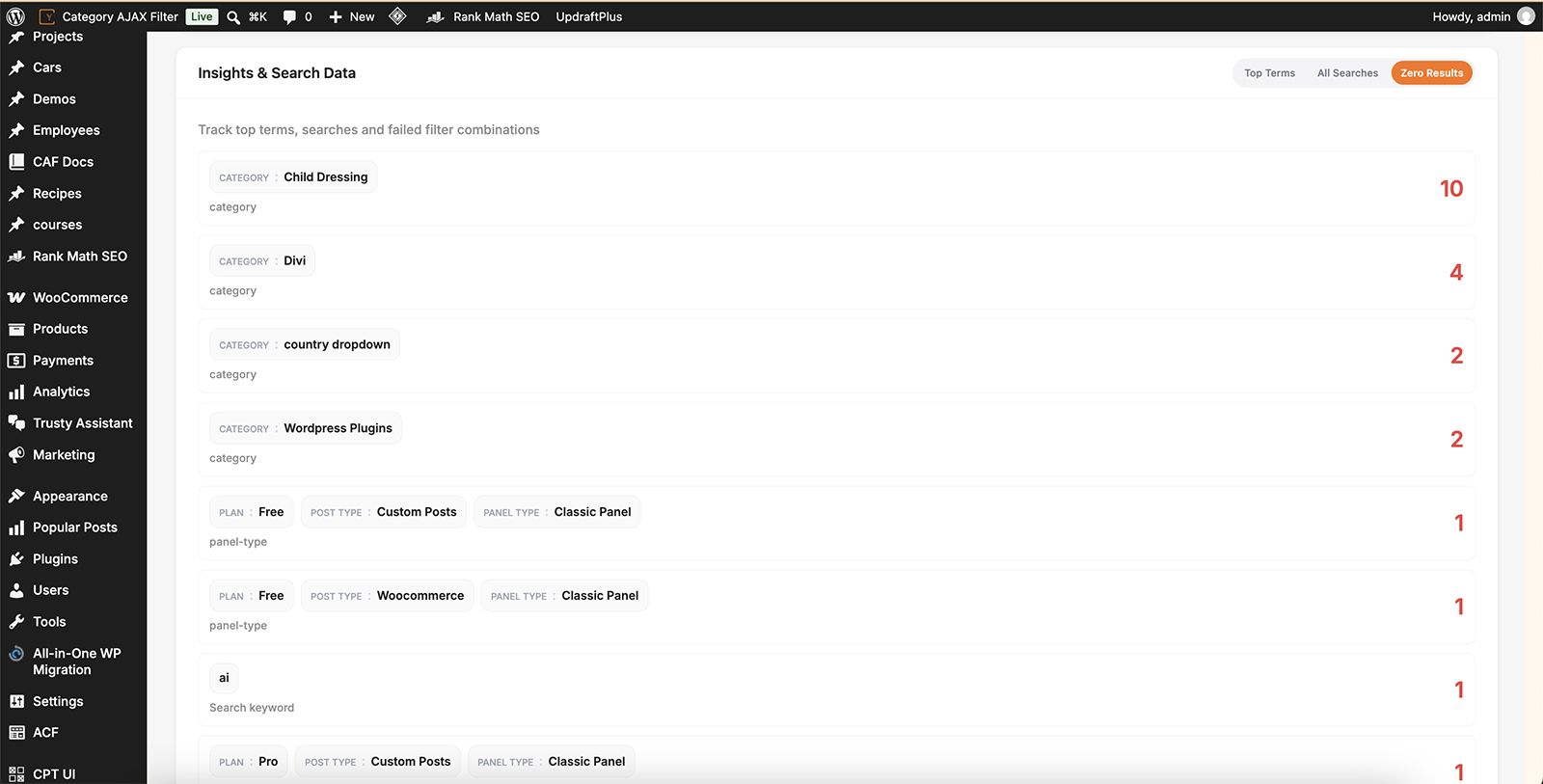
The choices made, and the one that emptied the results.
What to do about them
Work down from the highest counts. A combination that failed once may be nobody's problem; one that failed twenty times is a hole in your catalogue or your filter.
- The thing exists but wasn't found - the words don't match. Rename it, or widen which fields the search reads.
- The thing doesn't exist - you've been shown demand for something you don't stock, which is worth knowing on its own.
- The combination is impossible - two filters that can never both be true. Consider whether both belong in the same filter.
- One filter empties everything - if the same field keeps appearing as the last choice across many rows, that filter is the problem, not the visitors.
That last case is the one this tab is uniquely good at showing. A single field named underneath row after row means the terms in it don't line up with your content - and turning on Dynamic terms count stops it happening in the first place, because terms with nothing behind them are disabled before anyone can pick them.

Tip
Dynamic term counts prevent most of what appears on this tab. Where a visitor can only choose terms that still have results behind them, dead-end combinations largely stop existing - which makes this list shorter and the ones that remain more meaningful.

Note
A short list here isn't necessarily good news. It can mean your filters are working, or it can mean nobody is using them - check the Clicks figure on the overview before congratulating yourself.
FAQ
What are the chips in each row?
The choices the visitor made, shown as field and value, in the order they made them.
What's the field name underneath?
The selection that was made last - the one that took the results to zero.
How is this different from All Searches?
All Searches lists everything typed. This lists only what found nothing, and adds the filter combinations that failed.
The same field appears under lots of rows.
That filter is emptying the results more than any other. Its terms probably don't match your content well.
How do I stop dead ends happening at all?
Switch on dynamic term counts, so terms with no results behind them are disabled before anyone picks them.
Nothing is listed.
Either no one has hit an empty result in this period, or analytics isn't switched on for the filter you're looking at.
Was this page helpful?
Thanks for your feedback!