
What are rows & columns?
Rows and columns are the structure everything else sits in - and they work identically, with exactly the same settings.
In short
Everything you build follows the same three levels: a row holds columns, and a column holds modules. Add them with New Row and New Column in the Elements panel, and reorder them by dragging in that same tree. Rows and columns share one identical set of settings, so anything you learn on one applies to the other.
How the structure works
The canvas always has the same three levels: a row holds one or more columns, and each column holds modules. That's the whole structure - a column can't contain another row, so a layout never nests deeper than this.
You can see it in the Elements panel on the left, where rows, columns and modules are shown nested exactly as they're built.
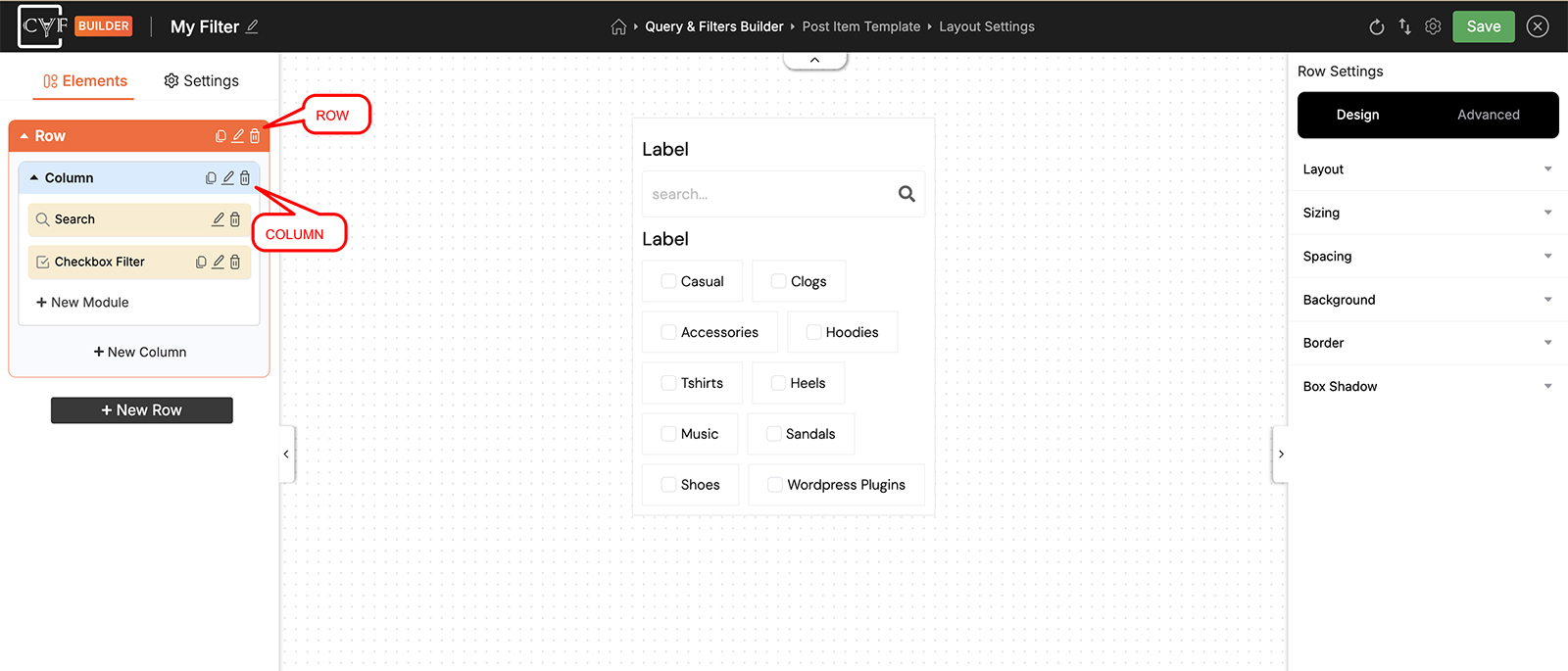
The Elements tree mirrors the structure exactly.
Adding and arranging them
-
Add a row
Click New Row at the bottom of the Elements panel. Each new row comes with a column ready to use.
-
Add columns to it
Click New Column inside a row to put another column beside the first - this is how you get filters sitting side by side rather than stacked.
-
Reorder by dragging
Drag rows and columns in the Elements tree to change their order. The canvas updates as you go.
Settings
Click the pencil on any row or column to open its settings on the right. Rows and columns have exactly the same set - there's nothing to learn twice. The Design tab covers appearance, and the Advanced tab covers the other advanced settings.
| Design Group | What it controls |
|---|---|
| Layout | How the children inside are arranged, using a flex layout system - direction, alignment, gap. |
| Sizing | Width and height, including how wide a column is. |
| Spacing | Padding and margin. |
| Background | Colour or image behind it. Gradients are Pro. |
| Border | Width, style, colour and radius. |
| Box Shadow | Shadow cast by the element. |

Tip
Column widths live under Sizing, not Layout. Layout arranges what's inside an element; Sizing controls the element itself.
FAQ
Can I put a row inside a column?
No - the structure is always row, then column, then module.
How do I make a column narrower or wider?
Open the column's settings and use Sizing in the Design tab.
Do rows and columns have different settings?
No - they share one identical set, so anything you learn on a row applies to a column.
How do I change the order of my rows?
Drag them in the Elements tree on the left.
Was this page helpful?
Thanks for your feedback!