
Spacing: margin & padding
Spacing gives an element room - margin outside it, padding within it.
In short
Margin is the space outside an element, pushing it away from whatever sits next to it. Padding is the space inside, between its edge and its content. Both are set for top, bottom, left and right, with a link button to change values together. On a filter module, Spacing splits into the parts that element is built from.
Margin and padding
Both are set as four values - top, bottom, left and right - each with its own unit. A link button beside the fields ties them together, so you can change them as one instead of typing the same number four times.
| Control | What it does |
|---|---|
| Margin | Space outside the element, holding it away from its neighbours. |
| Padding | Space inside the element, between its edge and its content. |
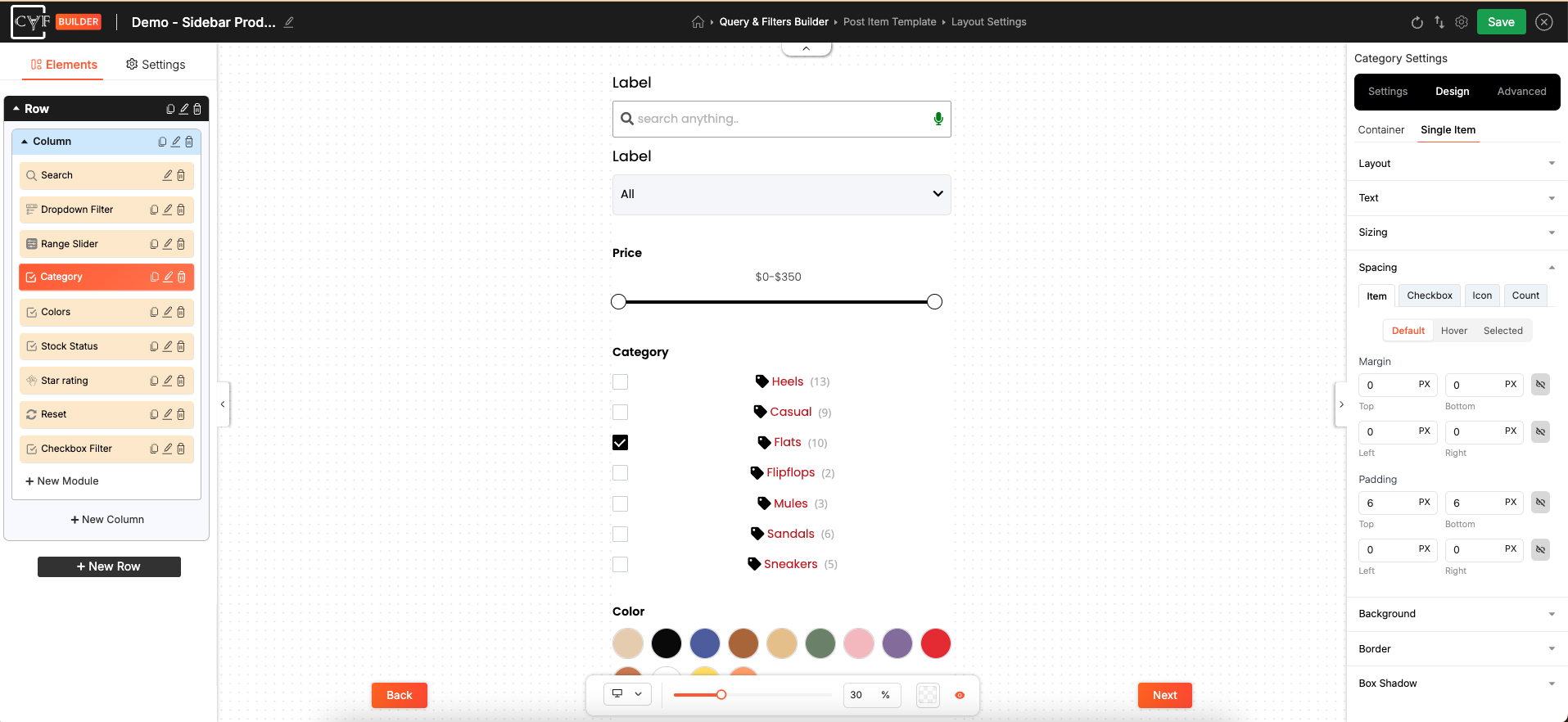
Four values each, with a link button to change them together.

Tip
The difference matters as soon as a background or border is set. Padding sits inside the coloured area and gives the content breathing room; margin sits outside it and separates the element from the next one. Cramped-looking filter items usually want padding, not margin.
Which part you're spacing
On a filter module, Spacing splits into the pieces that part is built from, each with its own margin and padding. A Checkbox Filter's Container, for instance, offers Outer Wrapper, Label and Items Container. Which pieces appear depends on the module and how it's set up - see Design tab.
Rows and columns aren't divided this way. They're a single piece, so they get one set of margin and padding values.

Warning
This is the group where picking the wrong piece is easiest to miss. Padding added to Outer Wrapper moves the whole module inwards, while padding on Items Container only affects the terms inside it. If a change looks like it did nothing, check which piece you were on.
Default and Hover
Spacing carries Default and Hover states, so an element can shift slightly as someone points at it. Used sparingly this adds a bit of life; used heavily it makes a filter jump around, since changing padding on hover moves everything nearby.

Note
Spacing is per device, like the rest of the Design tab. Generous padding that suits a wide desktop filter is often too much on a phone - switch device in the bottom bar and reduce it there.
FAQ
What's the difference between margin and padding?
Margin is outside the element and separates it from its neighbours. Padding is inside, between the element's edge and its content.
Can I set all four sides at once?
Yes - use the link button beside the fields to change them together.
Why does Spacing have tabs inside it?
On a filter module it splits into the pieces that part is built from, such as Outer Wrapper, Label and Items Container, each with its own spacing.
My spacing change did nothing - why?
It was probably applied to a different piece. Check which tab you were on before setting the value.
Can spacing differ on mobile?
Yes - switch device in the bottom bar first, then set it.
Was this page helpful?
Thanks for your feedback!