
Post image module
The picture for each result - where it comes from, what size it loads at, and where it leads.
In short
Post Image shows a picture for each result in your listing. It can take the post's featured image or read a custom field, at whichever registered image size suits the space. A placeholder covers posts that have no image, and the whole thing can be a link - to the post, or to an address held in a field of its own. Both of the custom field options, for the image and for the link, are Pro.
Where the image comes from
| Image Source | What it shows | Plan |
|---|---|---|
| Featured Image | The featured image set on the post or product. This is the usual choice. | ✓ FREE |
| Custom Field | An image held in a custom field, for content that stores its picture somewhere other than the featured image. | ★ PRO |
Point the image and its link at your own fields
The featured image and a link to the post are free, and cover most listings. With CAF Pro the module can read custom fields instead, in two places. Image Source can take the picture from a field of your own - which is what you need when the image lives somewhere other than the featured image, as it often does with imported catalogues or ACF galleries. And the link can go to an address held in a field, so a result can lead to a booking page, an external listing or a supplier's site rather than to its own post.
Image Size then decides which version loads. WordPress keeps several sizes of every upload, and your theme may add more - the list holds whatever your site has registered.
This one is worth thinking about rather than leaving alone. A listing three or four items across doesn't need the full-size upload, and loading it anyway makes the page heavier for no visible gain. A size close to the space the image actually occupies is the right answer.
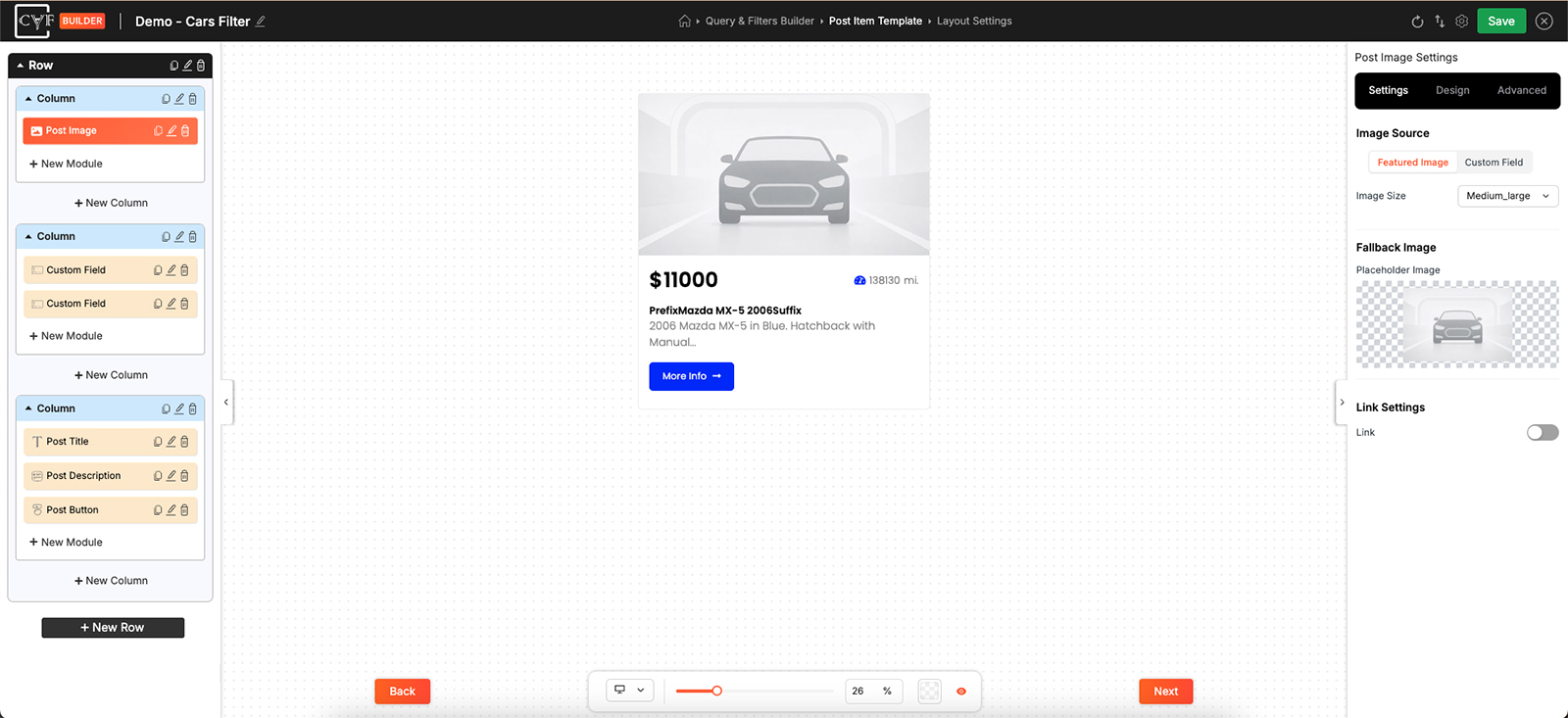
Featured image or custom field, at a size that matches the space.
Fallback Image
Not every post has a picture, and a grid with holes in it looks broken rather than sparse. Placeholder Image is what shows when a result has no image of its own, so every item in the listing keeps the same shape.
Something plain works best - a neutral graphic, or a mark of your own. It's standing in for a missing picture, not competing with the real ones around it.
Link Settings
Switch Link on and the image becomes clickable.
| Setting | What it does | Plan |
|---|---|---|
| Post URL | The image links to the post or product it belongs to. | ✓ FREE |
| Custom Field | The image links to an address held in a custom field, for results that should lead somewhere else. | ★ PRO |
| Open In | Whether the link opens in the same window or a new one. | ✓ FREE |

Tip
People click pictures whether or not you've made them clickable, so linking the image usually costs nothing and saves a wasted click. Keep it opening in the same window unless the destination genuinely belongs elsewhere - a new tab for every result quietly fills someone's browser.
Styling
How the image sits in the item comes from the Design tab, with the usual groups - Layout, Text, Sizing, Spacing, Background, Border and Box Shadow
Sizing is the group that matters most here. Images arriving at different shapes are what make a grid look untidy, and setting a size on the module gives every result the same footprint whatever it was uploaded as.

Note
Image Size and the Sizing group do different jobs. Image Size decides which file the browser downloads; Sizing decides how much room it takes up on the page. Set both - a small file stretched large looks soft, and a large file shrunk down is wasted bandwidth.
FAQ
Some results have no image and the grid looks broken.
Set a Placeholder Image under Fallback Image.
Can it use an image that isn't the featured image?
Yes - set Image Source to Custom Field and point it at the field holding the image.
Which image size should I pick?
One close to the space the image occupies in your layout. The full-size upload in a three-across grid is wasted weight.
Why is my image blurry?
It's loading at a smaller size than it's being displayed at. Pick a larger Image Size.
Can the image link somewhere other than the post?
Yes - set the link to Custom Field and hold the address there.
Can links open in a new tab?
Yes - Open In.
Was this page helpful?
Thanks for your feedback!