
How to add the filter shortcode to a page
Every filter you create has its own shortcode - copy it from the All Filters screen and paste it anywhere shortcodes work on your site.
In short
Copy your filter's shortcode from the All Filters screen, then paste it anywhere shortcodes work: a page, a post, a widget, an Elementor or theme builder template, or a PHP theme template using do_shortcode(). It isn't limited to the main content area.
Copying and placing your shortcode
-
Copy the shortcode
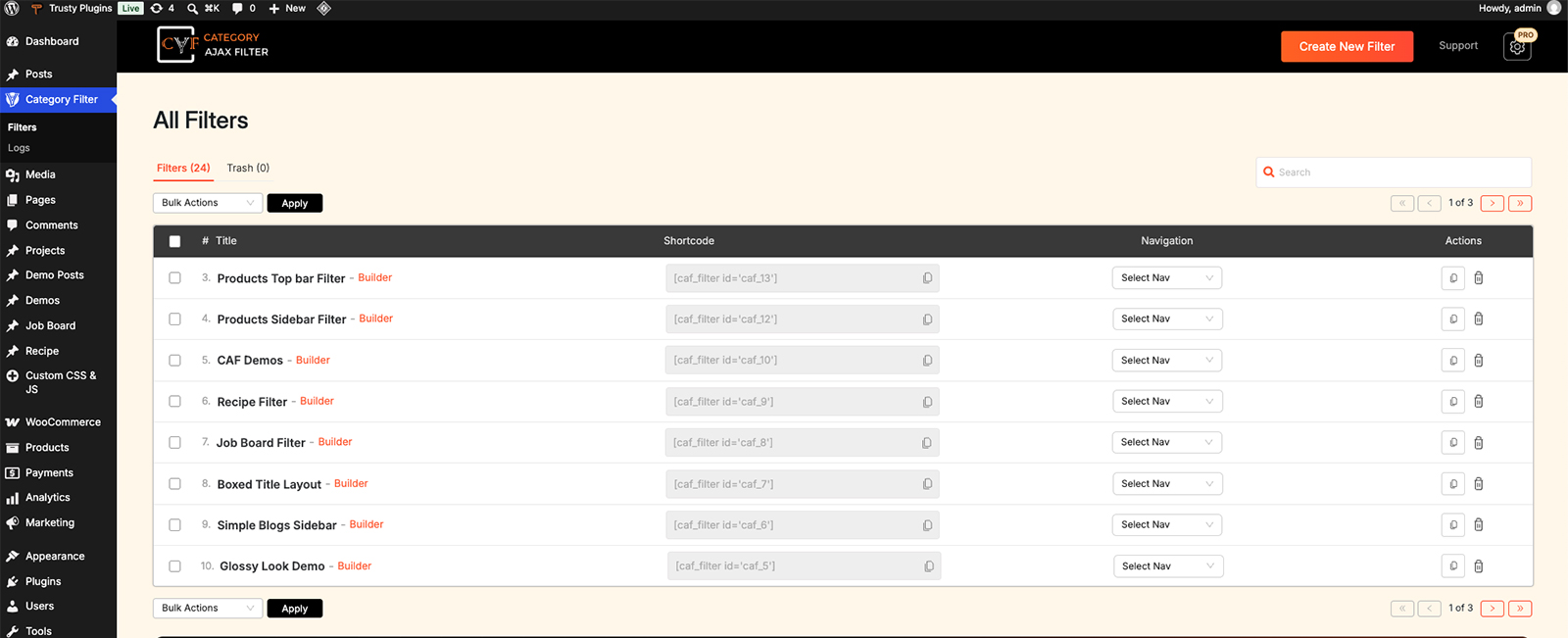
Go to Category Filter → Filters. Each filter has its own shortcode in the Shortcode column - click the copy icon next to it.
-
Paste it anywhere shortcodes work
Paste it into a Shortcode block in the block editor, a text widget, an Elementor Shortcode widget, or in template code with do_shortcode() - it works anywhere shortcodes are normally supported on your site.

Tip
Every filter has its own unique shortcode - copying the wrong one will show a different filter, so double-check you've grabbed the right one from the list.
FAQ
Can I use the shortcode anywhere on my site?
Yes - anywhere shortcodes are normally supported, not just the main content area.
Does it work with Elementor?
Yes - paste it into an Elementor Shortcode widget.
Was this page helpful?
Thanks for your feedback!