
What are modules?
A module is a single functional element placed inside a column. Modules are what your visitors see and interact with - the controls that make up the filter, and the content that makes up each result.
In short
Modules are placed inside columns, and the set available to you depends on the step you're working in. Filter modules build the filter itself in Query & Filters Builder; post modules define each result in Post Item Template. Every module has a Settings tab for its own options, alongside the same Design and Advanced tabs used by rows and columns.
Where modules live
A module is always placed inside a column - see Rows & columns for the structure. The modules available to you depend on which step you're working in, because each step builds a different part of the filter.
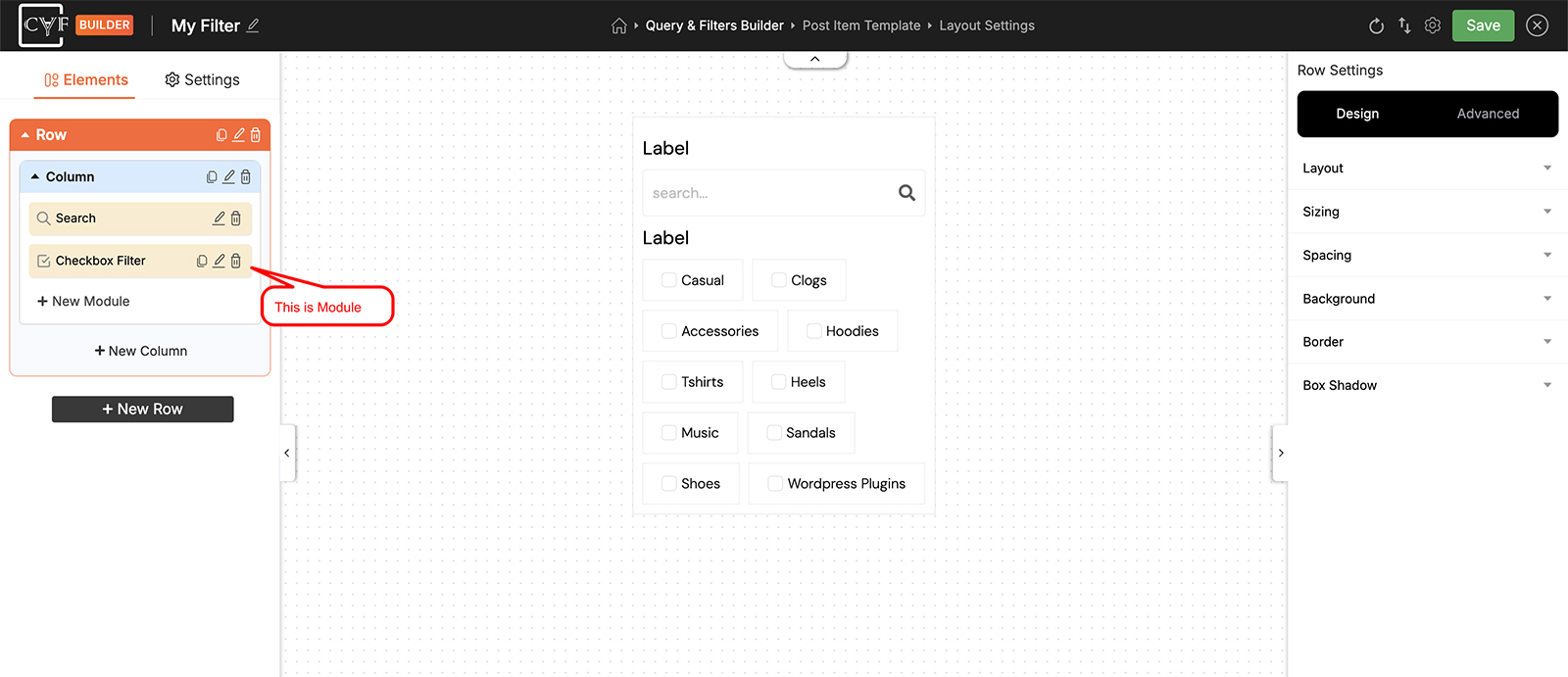
Modules sit inside a column, listed in the Elements tree.
The two module families
Modules fall into two families, one for each of the steps that use them.
Filter modules
Filter modules are used in Query & Filters Builder. Together they form the filter your visitors interact with. Most work with any post type. Star Rating reads the WooCommerce product rating, so it only applies when you're filtering products. On the free version, Range Slider filters WooCommerce price only.
| Module | Plan | Works With |
|---|---|---|
| Search | Free + Pro | Any post type |
| Checkbox Filter | Free + Pro | Any post type |
| Dropdown Filter | Free + Pro | Any post type |
| Range Slider | Free + Pro | Any post type |
| Star Rating | Pro | WooCommerce |
| Reset | Free + Pro | Any post type |
| Custom Text | Free | Any post type |
Post modules
Post modules are used in Post Item Template, where they define the content of each result. Most work with any post type, but several are specific to WooCommerce - these read product data such as price, rating and stock, so they only apply when you're filtering products and require WooCommerce to be active.
| Module | Plan | Works With |
|---|---|---|
| Post Image | Free + Pro | Any post type |
| Post Title | Free + Pro | Any post type |
| Post Description | Free | Any post type |
| Post Author | Free + Pro | Any post type |
| Post Date | Free + Pro | Any post type |
| Terms | Free + Pro | Any post type |
| Comment Count | Free + Pro | Any post type |
| Post Button | Free + Pro | Any post type |
| Custom Field | Pro | Any post type |
| Custom Text | Free | Any post type |
| Product Image / Gallery | Free + Pro | WooCommerce |
| Product Price | Free + Pro | WooCommerce |
| Product Rating | Free + Pro | WooCommerce |
| Add to Cart | Free + Pro | WooCommerce |
| Attribute Swatch | Pro | WooCommerce |
| Badges | Pro | WooCommerce |
Module settings
Click the pencil on a module to open its settings. Every module has a Settings tab carrying the options that belong to that module alone - which taxonomy a Checkbox Filter reads from, for instance. Beside it are the same Design and Advanced tabs that rows and columns have, so styling a module works exactly the way styling a row does.
Some free modules carry individual Pro options inside their Settings tab. These are marked with a PRO tag and greyed out until you have Pro - the Search module's AI Search and Voice Search options work this way, for example. See Free vs Pro comparison.

Note
A filter can only have one Search module. That's why Search shows just an edit and delete icon in the Elements tree, while other modules also offer duplicate.
Moving modules
Drag a module in the Elements tree to reorder it, or to move it into a different column or row entirely.
FAQ
Where can I put a module?
Inside a column - modules never sit directly in a row.
Why can't I duplicate the Search module?
A filter can only have one Search module, so there's nothing to duplicate.
Can I move a module into a different column?
Yes - drag it there in the Elements tree.
Do modules style the same way as rows and columns?
Yes - the Design and Advanced tabs are identical. Modules just add a Settings tab for their own options.
Which modules need Pro?
Star Rating, Custom Field, the post Custom Text module, Product Rating and Attribute Swatch are Pro. Range Slider is free for WooCommerce price, and Pro for any numeric custom field. Badges are free for the New and Sale types, and the other types are Pro.
Do I need WooCommerce for the product modules?
Yes - the product modules read WooCommerce data, so they apply only when you're filtering products and WooCommerce is active. The Star Rating filter module is the same.
Why is an option inside a module greyed out with a PRO tag?
It's a Pro option within an otherwise free module - the module itself works, but that particular option needs Pro.
Was this page helpful?
Thanks for your feedback!