
How to delete a filter
Filters are deleted from the All Filters screen, and they go to Trash first - so a deletion can be undone.
In short
On the All Filters screen, click the bin icon in a filter's Actions column, or select several and use Bulk Actions. Deleted filters move to the Trash tab, where you can restore them. Any page still carrying that filter's shortcode simply stops showing the filter.
Deleting a filter
-
Go to All Filters
In your WordPress dashboard, go to Category Filter → Filters.
-
Delete one, or several at once
For a single filter, click the bin icon in its Actions column. To remove several, tick their checkboxes, choose Move To Trash from Bulk Actions and click Apply.
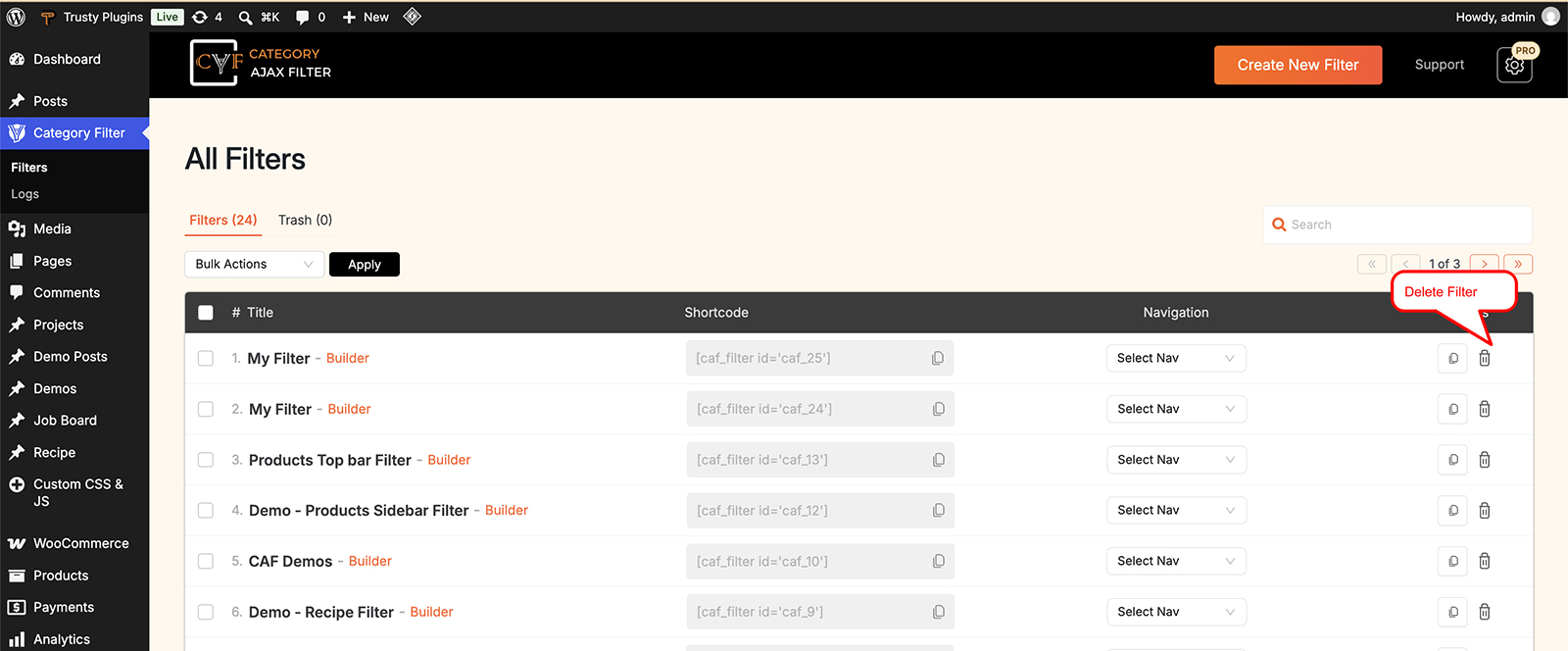
Delete one from Actions, or several with Bulk Actions.

Careful
Any page, post or widget still holding this filter's shortcode will stop showing the filter - nothing appears in its place. Remove the shortcode from those pages, or swap in another filter.
Restoring from Trash
Deleted filters aren't gone immediately. They move to the Trash tab at the top of the All Filters screen. From there you can restore a filter with Restore Filter, or remove it for good with Delete Permanently. Both also work for several filters at once through Bulk Actions.

Warning
Delete Permanently can't be undone. If you might need the filter again, export it first from the import/export icon in the builder's top bar.
FAQ
Can I get a deleted filter back?
Yes - deleted filters go to the Trash tab on the All Filters screen, and can be restored from there.
What happens to pages where I placed the shortcode?
The filter simply stops showing - nothing appears in its place, so it's worth removing the shortcode from those pages.
Can I delete more than one filter at a time?
Yes - tick the filters you want, then use Bulk Actions and click Apply.
Was this page helpful?
Thanks for your feedback!