
How to install Category AJAX Filter Pro
Category AJAX Filter Pro is downloaded and activated using the download and license code from your order confirmation page - if you already have the free version installed, it's switched over automatically.
In short
Download Category AJAX Filter Pro and get your license code - both are shown together on your order confirmation page right after purchase, or in My Account anytime after that. Install it like any WordPress plugin; if the free version is active, it's deactivated automatically. Then activate it with your license key.
Installing Category AJAX Filter Pro
-
Download Pro and get your license
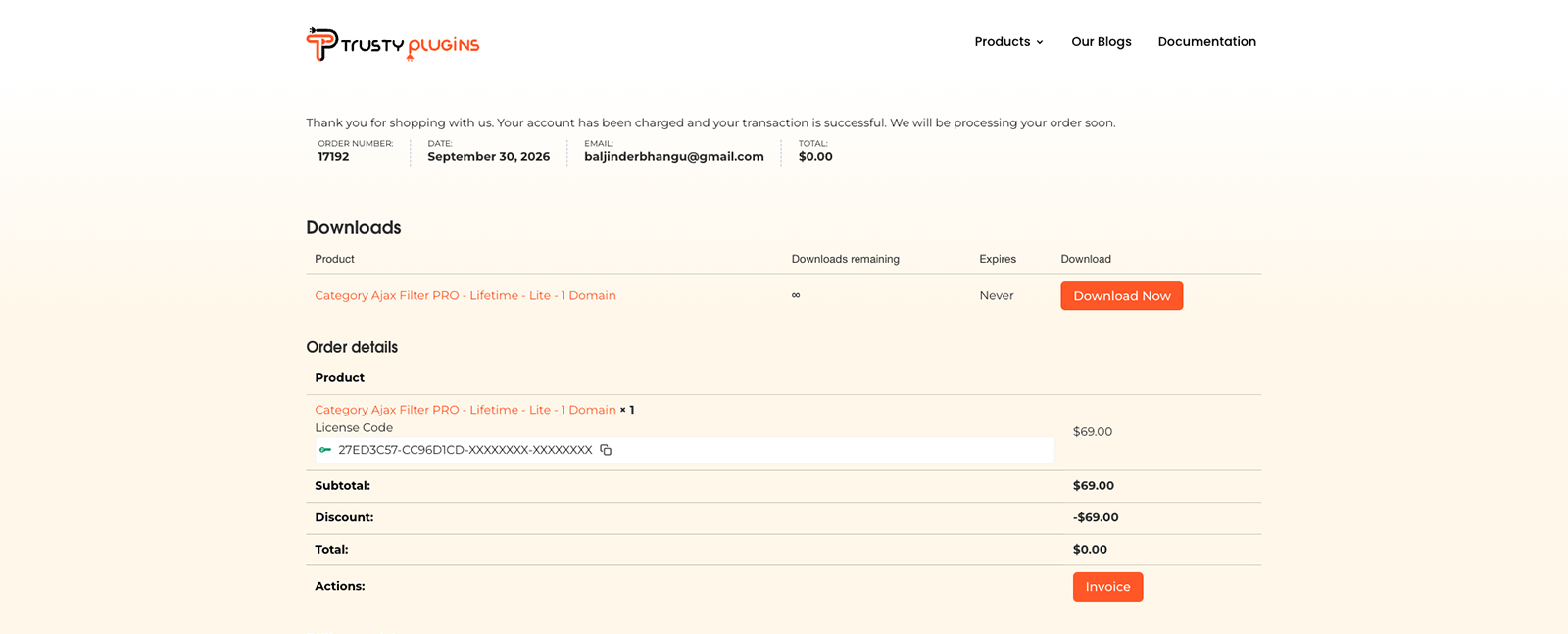
Right after you purchase, your order confirmation page shows both the plugin download and your license code together - you don't need to log in separately the first time. See Downloading your copy for the full walkthrough, including where to find both again later from My Account.
-
Install and activate
In your WordPress dashboard, go to Plugins → Add Plugin → Upload Plugin, choose the ZIP file you downloaded, then click Install Now followed by Activate. If you already have free version active, it's deactivated automatically as part of this step - your existing filters and layouts stay in place.
-
Enter your license key
Go to Category Filter → License, paste in your license key and email address - from your order confirmation page, or from My Account if you're doing this later - then click Activate. Without it, published filters on the frontend keep working, but the builder, analytics, and admin tools stay locked. Activating your license covers this step in more detail.

Note
Free is deactivated automatically once Pro is active - Free and Pro can't run at the same time. If it doesn't deactivate on its own, you can do it manually from Plugins. Either way, your existing filters are kept when you switch.
- Pro plugin downloaded and installed
- License key and email entered, and Activate clicked
FAQ
Do I need to deactivate the free version myself?
No - it's deactivated automatically once Pro is active. If that doesn't happen, you can deactivate it manually from Plugins.
Will I lose my existing filters when I switch to Pro?
No - your existing filters are kept when you switch.
What happens if I don't enter a license key?
Published filters on the frontend keep working, but the builder, analytics, and admin tools stay locked until you activate.
Where do I find my license key?
In My Account → License Manager at trustyplugins.com. It's also shown on your order confirmation page and in your order email.
Was this page helpful?
Thanks for your feedback!